If you accidentally deleted word document files from your Windows 10 computer, do not worry, because it is possible to recover deleted documents from Windows 10 computer. All you need to do is to download a Windows data recovery software. Here's a good one: Windows document recovery
You can recover deleted documents from Windows 10 due to various reasons
- Documents deleted after computer hard disk crash or reformat
- Lost documents after user restore Windows computer
- Document deleted from Windows computer recycle bin
- Shift deleted document files
- Documents lost after computer infected by virus
The Windows document recovery software can recover deleted documents from Windows 10, Windows 8, Windows 7, Windows Vista, Windows XP computer. It is easy to use and can recover deleted documents from computer hard disk, both laptop and desktop computer are supported.
More information
Restore lost files after recycle bin empty
how to recover deleted files from Windows computer
How to get back files from Seagate hard disk
Friday, 28 April 2017
Friday, 7 April 2017
Best Android phone photo recovery software
If you have an Android phone such as Samsung Galaxy, Sony Xperia, LG, Huawei, Oppo, HTC, you may experience the situation that your photos on your Android phone are deleted by mistake, or you have to restore your phone to factory settings and lost all photos on your phone.
So how to recover deleted photos on your Android phone? The best way to recover deleted photos from Android phone is to use an Android photo recovery software. Here's some best Android phone photo recovery software you can use:
Asoftech Android photo recovery
001 picture recovery
The Android photo recovery software mentioned above are easy to use and can recover deleted photos from Android phone internal storage and memory card, such as SD card, microsd, sdhc, sdxc, sd mini, cf card. You can also recover lost photos after Android phone crash.
If you also accidentally deleted photos from your Android phone or tablet, you may try above photo recovery software to restore your lost photos.
Monday, 27 March 2017
recover deleted photos from olympus camera
If you by mistake deleted photos from Olympus digital camera, do not worry, because it is possible to recover deleted pictures from Olympus digital camera. All you need to do is to follow this step by step tutorial.
Olympus camera photo recovery
The olympus camera photo recovery software is easy to use. You can use it to recover deleted photos from Olympuse cameras, such as Olympus OM-D E-M5, Evolt E410, XZ-1, VR-340, Olympus Pen E-PM1, Pen E-P3, SZ30, Evolt E-3, Olympus Stylus 7030, Stylus Tough 8010, Olympus PEN e-PL1, SZ-12, VG-160, Evolt E500, Stylus 1010, Stylus 6020, SP-565UZ, Olympus Camedia C755, Stylus 710, C-4000, FE-340, C-2100, Camedia C-5050, SZ-10 and other Olympus Digital SLR camera.
More information
Recover deleted photos from pen drive
SD card format recovery solution
Nikon coolpix photo recovery
Monday, 27 February 2017
undo delete sd card
I accidentally deleted files from my SD card, how can I undo delete SD card and restore all my deleted files from SD card?
SD memory cards are often used in digital cameras, camcorders, action cam, video camera, smartphones, Android phones, Samsung Galaxy, HTC, LG, Sony Xperia, Huawei, Lenovo, Oppo, Xiaomi, Asus, Acer, and other android phones and tablets. Users may by mistake formatted SD card and lost all files on the SD card. So is it possible to recover deleted files from SD card?
There are many different types of SD cards such as microSD, SDHC, SDXC, SD mini, microSDHC, microSDXC and more. In addition, each card type has different brands like SanDisk, Kingston, Transcend, PNY and more.
The best way to recover deleted files such as photos, videos, songs, documents from SD card is to use a SD card data recovery software. You can follow this tutorial: how to recover files from SD card
The SD card data recovery software is easy to use and can recover deleted files from all kinds of SD card, such as SanDisk Extreme, SanDisk Extreme PRO, SanDisk Ultra SD card, Lexar, Panasonic, Toshiba, etc.
Related articles
Recover files from formatted SD card
Recover data from microsd card
Retrieve back photos from SD card after reformat
Thursday, 5 January 2017
how to recover deleted videos from sony handycam dcr-sr68/HDR-CX240/HDR-PJ620/PXWS-X70
Sony Handycam is a modern camcorder which can function as a
video camera and a video recorder, unlike old models that only handles
video recording. Today’s handycam are loaded with added features which
include the use of a hard drive and memory cards to save recorded videos
and images instead of a video tape.
If you by mistake deleted videos from Sony Handycam camcorder, do not worry, because it is possible to recover deleted videos from Sony Handycam. All you need is to a professional Sony handycam recovery software. Download Sony HandyCam recovery software from: How to restore videos from Sony Handycam
The sony HandyCam data recovery software is easy to use and you can recover deleted photos/videos from Sony camcorder.
Here are some of the important things that you need to consider before and after you perform a Sony Camcorder file recovery.
Before: Be certain not to take new pictures and videos with your Sony Handycam. If you do, the erased file will be overwritten and they will be lost permanently.
After: Once done with the file recovery, do not save them back to your Sony Camcorder or its memory stick. Go and save them on another place such as your computer folder, other flash drive, or external hard drive for better safe keeping.
Related articles
How to restore files from Canon Camcorder
Recover videos from Sony FDR-AX100 Handycam
Recover deleted video from panasonic camcorder
Sunday, 2 October 2016
how to recover deleted files from external hard drive
If you by mistake deleted files from external hard disk, do not worry, because it is possible to recover deleted files from external hard drive. You can follow this step by step tutorial:
external hard disk data recovery
The external hard disk data recovery software is easy to use. You can recover deleted photos, videos, songs, documents, and other files and folder from external hard disk. You can also recover lost files after external hard drive reformat.
The external hard drive data recovery solution supports data recovery from all popular external hard drive, such as Maxtor D3 Station, Seagate Expansion, WD My Book, Seagate Innov8, WD My Book Duo, Maxtor M3 hard disk drive, Seagate Wireless Plus, iStorage diskAshur, WD My Passport Ultra, Seagate Backup Plus Slim, etc.
Read more
How to recover deleted files from external hard drive
Restore files from WD external hard disk
How to get back files from portable hard drive
Monday, 5 September 2016
best video converter for windows 10/7/8/Vista/XP
If you have a video that is not supported by your mobile device, or has problem playing video, you may consider getting a video converter software to convert video to format that is supported by your device, such as mobile phones, tablet, iPhone, iPad, iPod, Mac, Android phones, portable media player, etc.
Here's some best video converter software in the market which you can trust.
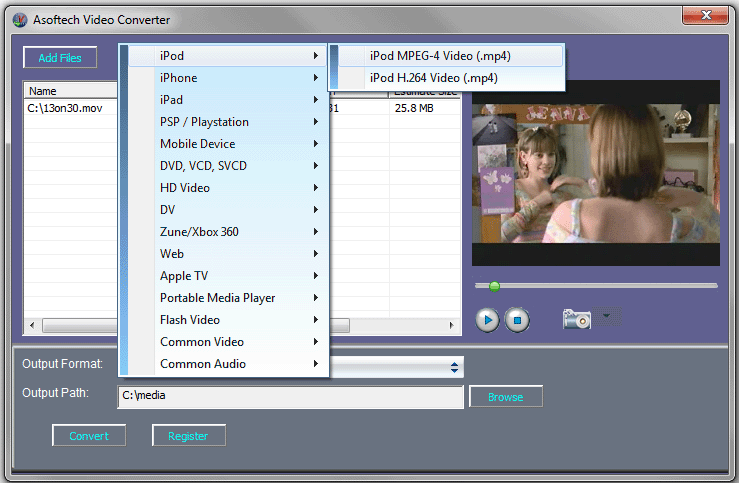
1. Asoftech Video Converter
Asoftech Video Converter is easy to use and can convert video between various formats, such as mov, avi, mp4, asf, mkv, wmv, etc. You can download it from
how to convert videos between different formats
The video format converter can convert video fast and works for many different video formats.
2. 001 Video Converter
001 video converter is another popular video converter which can convert videos for your personal devices such as iPhone, iPod, iPad, Android phones such as Samsung Galaxy, LG, Sony Xperia, Huawei, etc.
Read more about 001 video converter
The video converter software is easy to use. You can see its screenshot.
Related articles
How to convert mov to avi
Convert mp4 to mp3
Easy way to convert mkv to mp4
Labels:
video converter
Subscribe to:
Posts (Atom)